-
VRMods NRF Trackers (x6-x10)
Regular price From $360.000Regular priceUnit price per$470.000Sale price From $360.000Sale -
Extra Pack (x1) VRMods NRF Trackers
Regular price From $65.000Regular priceUnit price per$120.000Sale price From $65.000Sale -
Upgrade Pack (x2) VRMods NRF Trackers
Regular price From $130.000Regular priceUnit price per$250.000Sale price From $130.000Sale




Technology
How do our Trackers work?
Select your tracker line to see all technical details, available sensors and how the technology works.
Classic WiFi Classic WiFi — Sensor Comparison
⭐ Top

BNO085
High precision and maximum reliability
Drift
35–45 min
Price9 / 10
Precision8.5 / 10
💎 Value

ICM-45686
Best value for money
Drift
30–50 min
Price7 / 10
Precision7.5 / 10

LSM6DSR
Good response speed
Drift
10–20 min
Price6.5 / 10
Precision6.5 / 10

BMI160
Basic and economical option
Drift
5–10 min
Price5 / 10
Precision6 / 10
How do Classic Trackers work?
The VRMods Classic sensors work with SlimeVR, connecting via Wi-Fi 2.4GHz to your PC or Android. The system detects them as HTC trackers in SteamVR.
-
1Install the SlimeVR app on your PC or Android and connect to the same 2.4GHz Wi-Fi network.
-
2With SteamVR they integrate as HTC sensors — compatible with any Full Body Tracking game.
-
3Playing standalone on Quest, the OSC function calibrates automatically without needing SteamVR.
What is Drift?
The Drift is the natural cumulative deviation of inertial sensors. They all have it — the difference is how long they take to drift.
BNO085
35–45 min
ICM-45686
30–50 min
LSM6DSR
10–20 min
BMI160
5–10 min
Recalibration in 5–10 sec by touching the sensors with SlimeVR open.
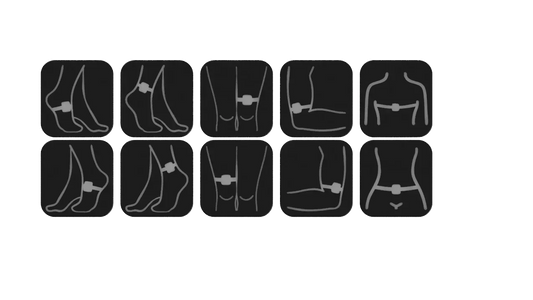
Chest ×2
Left Leg ×3
Right Leg ×3
NRF Trackers NRF Trackers — How they work
Direct connection without router
The VRMods NRF Trackers connect directly to your PC or Quest via a USB receiver dongle. They do not need a WiFi router: the signal goes directly to the receiver.
-
1Connect the NRF USB dongle to your PC or Quest and turn on the trackers. With SlimeVR open, it will detect them automatically.
-
2The trackers pair automatically with the receiver without additional configuration.
-
3If you are a PCVR user, SteamVR will automatically recognize them as HTC trackers compatible with VRChat, Beat Saber and all FBT games. If you use Meta Quest Standalone, the connection is configured wirelessly via OSC to VRChat.
Advantages over the Classic line
Lower latency
Direct signal to the receiver without going through a router. Faster response with every movement.
Greater stability
No WiFi network interference. The NRF signal is more robust and consistent during long sessions.
Instant reconnection
If a tracker disconnects, it reconnects in seconds without restarting SlimeVR.
NRF vs Classic Comparison
Connection
Direct USB Dongle
Requires WiFi router?
No
Latency
Lower than Classic
Compatibility
Quest · Quest-PC · SteamVR
Available in
X6 · X8 · X10